

TAFJ Promoted Columns with Data Lifecycle Management

This post is a bit more technical, as it covers one of the most important topics regarding database maintenance in T24: promoted columns with Data Lifecycle Management. This is equivalent to applying an index to improve the performance of our queries, but at a slightly more complex level.
First, we need to answer two questions:
What is Data Lifecycle Management?
It is an archival solution for Temenos Transact. With DLM, a second database is added to the Transact deployment architecture to store the archived data.
What is a promoted column?
Promoted columns are relational columns whose data is generated through a function when the record is inserted or updated, allowing them to perform better when indexed using an XML index.
It is important to remember that in this solution we have two databases: our LIVE database and our Read-Only (RO) database, which contains copies of the data from our production tables. This setup enables multiple options to implement performance improvements for our database queries.
During the Data Lifecycle Management (DLM) setup process, all the promoted columns available in the LIVE database are created in the RO database using a utility script.

This task can be automated using a stored procedure — a predefined set of SQL commands designed to to automate tasks in a database. In this case, the stored procedure manages promoted columns in the DLM (Data Lifecycle Management) database.
Here’s what it does:
Function and Column Setup: The procedure generates and executes the function required for a promoted column, adds the promoted column to the table, and creates an index on it to improve query performance.
Table Check: When executed for a specific table, it first checks if that table exists in the DLM database.
Column Synchronization: If the table already exists in DLM, the procedure compares the promoted columns in the LIVE table and the DLM table.> Any promoted columns present in the LIVE table but missing in the DLM table are created in DLM.the next section provides details about the script execution to be done after the initial separation, to create the functional index in various LIVE databases.For MSSQLThe stored procedures should be executed only from the RO database. It is sufficient to have a PUBLIC role for the user to execute the PromotedColumnWrapper procedure in the RO database for the following tables.
sys.sql_expression_dependencies
INFORMATION_SCHEMA.ROUTINES
sys.objects
sys.columns
sys.tables
sys.schemas
sys.computed_columns
sys.indexes
sys.index_columns
The store procedures are the next:
Create a promoted column in the LIVE database
CREATE FUNCTION dbo.FBNK_STMT_ENTRY_NOILP (@xmlrecord XML)
RETURNS nvarchar(100)
WITH SCHEMABINDING
BEGIN
RETURN @xmlrecord.value('(/row/c12/text())[1]', 'nvarchar(100)')
END;
Add a new promoted column in the LIVE database
ALTER TABLE dbo.FBNK_STMT_ENTRY
ADD Currency AS dbo.FBNK_STMT_ENTRY_NOILP(XMLRECORD) PERSISTED;
Add a new index in the LIVE database
CREATE INDEX IDX_FBNK_STMT_ENTRY_C12 ON FBNK_STMT_ENTRY(Currency);The following is the RO table schema before the execution of promoted column SP.

Execution of wrapper SP
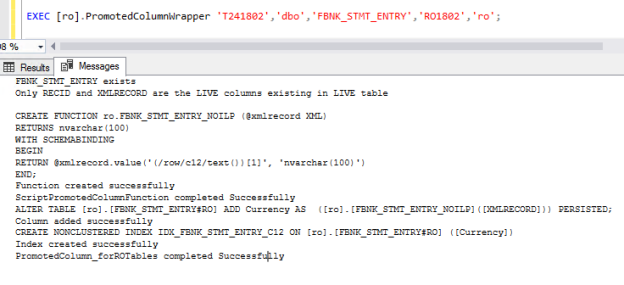
The schema of the RO table is altered with the newly added promoted column and an index.

With the above completed, all that remains is to perform the corresponding tests to ensure that the changes have been applied to the databases.
Remember that promoted tables convert complex XML data into more efficient and faster-to-access structures, making them especially useful for reporting and analysis in T24.
If you want to know how to apply these improvements to your Oracle, MSSQL, or DB2 database to greatly enhance performance for your database operations, don’t hesitate to contact us. At Performetriks, we'll be happy to help you!
Keep up the great work! Happy performance engineering! #T24 #TemenosTransact #DataLifecycleManagement


Comments